Office Products > Office Electronics > Pencil Sharpeners
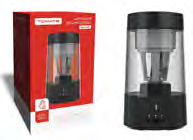
USB Electric Pencil Sharpener MAT-A03
Brand: Generic / OEM
•
Audited BOM: 9 Components
🛠️ Troubleshooting Guide & Return Mitigation
Verified Self-Service BaseQuick guide for the MAT-A03 USB Electric Pencil Sharpener: proper use, troubleshooting, and defect prevention for maximum durability.
RMA Prevention Tags:
#improper_usb_connection
#blade_cleaning
#overuse_prevention
#incorrect_pencil_insertion
🔍 Colloquial Consumer Search Queries:
“electric pencil sharpener not working”
“usb pencil sharpener won't turn on”
“pencil not sharpening properly”
“pencil sharpener broke”
“how to clean electric pencil sharpener”
🚀 Quick Start & Safe Operation Guide
1
Connect the USB cable to a stable power source (computer, power bank).
🔒
+3 Detailed Operational Steps Locked in Torfus Pro
Unlock Steps
⚡ Easy DIY Troubleshooting & Common Fixes
🔧
prob_01
The sharpener does not turn on.
Common root cause: Loose USB connection or insufficient power source.
Step-by-step solution: Ensure the USB cable is firmly connected to the sharpener and the power source. Try a different USB port or power source.
💡
Pro tip: Always use the included USB cable and connect to a computer USB port or a quality power adapter.
📸
Evidence to provide support: Clear photo of the sharpener's USB port and connected power source.
🔒
+2 Exclusive Verified Technical Solutions Locked
Engineering diagnostics for mechanical jams, thermal overloads, and seal failures available in the Full Dossier.
Unlock Full Guide
🚫 What NEVER to Do (Common Misuse Warnings)
⚠️ Forcing the pencil into the mechanism or attempting to sharpen non-wood pencils.
err_01
Consequence: Damage to the rotating blade, motor, and auto-stop mechanism.
✓ How to avoid: Use only wooden pencils with a diameter between 6mm and 8mm and apply light, consistent pressure.
🔒 +2 Critical Misuse Warnings Locked
Engineering alerts to prevent motor burnout, voided manufacturer warranty, and catastrophic component breakdown.
View All Warnings
⚙️ Hardware Setup, Adjustments & FAQs
🔒 +1 Hardware Setup & Calibration FAQs Locked in Torfus Pro
Unlock
⚖️
⚖️ Seller Warranty & Marketplace Dispute Conciliation
Contact support under the seller's warranty and marketplace return policy if the sharpener fails to power on after trying different power sources and cables, if the rotating mechanism does not function even with a correctly inserted pencil, or if it exhibits abnormal, constant noises indicating an internal defect or manufacturing issue.