Electronics > Cell Phones & Accessories > Cell Phone Accessories > Selfie Sticks
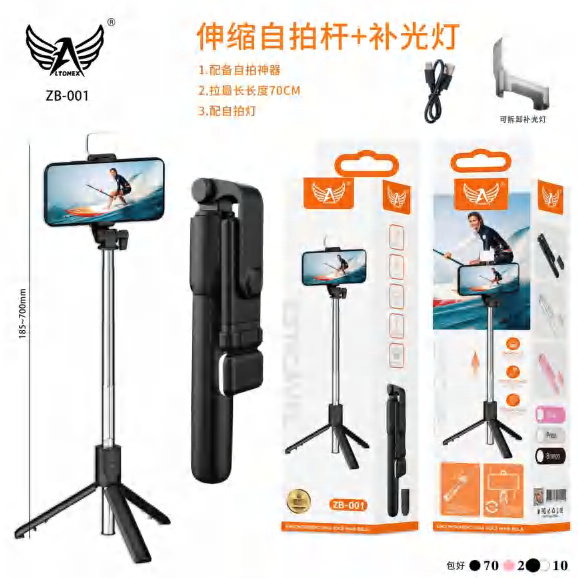
Portable Remote Control Selfie Stick ZB-001
Brand: Generic / OEM
•
Audited BOM: 10 Components
🛠️ Troubleshooting Guide & Return Mitigation
Verified Self-Service BaseQuick guide for your ZB-001 Selfie Stick: usage, care, and common troubleshooting to ensure durability and functionality.
RMA Prevention Tags:
#improper_pole_use
#remote_battery_drain
#dirty_connector
#excessive_force
🔍 Colloquial Consumer Search Queries:
“selfie stick remote not working”
“selfie stick won't connect bluetooth”
“selfie stick broken pole”
“selfie remote not turning on”
“how to use selfie stick”
🚀 Quick Start & Safe Operation Guide
1
Carefully extend the selfie stick by twisting the sections to lock them in place.
🔒
+3 Detailed Operational Steps Locked in Torfus Pro
Unlock Steps
⚡ Easy DIY Troubleshooting & Common Fixes
🔧
prob_01
Remote control won't connect via Bluetooth
Common root cause: Low or dead battery in the remote.
Step-by-step solution: Check if the remote battery is inserted correctly and try replacing it with a new one. Press and hold the remote button for a few seconds to activate it.
💡
Pro tip: Keep a spare battery handy or use rechargeable batteries to avoid interruptions.
📸
Evidence to provide support: Short video showing Bluetooth pairing attempt.
🔒
+2 Exclusive Verified Technical Solutions Locked
Engineering diagnostics for mechanical jams, thermal overloads, and seal failures available in the Full Dossier.
Unlock Full Guide
🚫 What NEVER to Do (Common Misuse Warnings)
⚠️ Excessively forcing the pole sections to extend or retract.
err_01
Consequence: Breakage of the locking mechanism or damage to the pole.
✓ How to avoid: Gently twist each section to unlock and extend/retract. Lock firmly before use.
🔒 +2 Critical Misuse Warnings Locked
Engineering alerts to prevent motor burnout, voided manufacturer warranty, and catastrophic component breakdown.
View All Warnings
⚙️ Hardware Setup, Adjustments & FAQs
🔒 +1 Hardware Setup & Calibration FAQs Locked in Torfus Pro
Unlock
⚖️
⚖️ Seller Warranty & Marketplace Dispute Conciliation
If, after following all usage and troubleshooting instructions, the remote control does not pair, the pole does not lock correctly, or there is any other defect preventing normal product function that is not a result of misuse, activate the warranty according to the seller's warranty and marketplace return policy.