Beauty & Personal Care > Hair Care > Hair Clippers & Trimmers
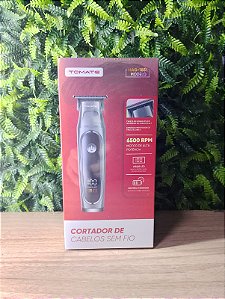
MAG-1831 Cordless Hair Clipper
Brand: Generic / OEM
•
Audited BOM: 7 Components
🛠️ Troubleshooting Guide & Return Mitigation
Verified Self-Service BaseQuick guide for your MAG-1831 Cordless Hair Clipper: usage, care, and common troubleshooting to ensure performance and durability. Avoid misuse and contact support when necessary.
RMA Prevention Tags:
#incorrect_charging
#blade_cleaning
#device_drop
#use_without_oil
🔍 Colloquial Consumer Search Queries:
“mag-1831 cordless clipper not turning on”
“mag-1831 not charging”
“mag-1831 clipper blade stuck”
“mag-1831 making weird noise”
“how to clean mag-1831 clipper”
🚀 Quick Start & Safe Operation Guide
1
Fully charge the device before first use (approx. 2 hours).
🔒
+3 Detailed Operational Steps Locked in Torfus Pro
Unlock Steps
⚡ Easy DIY Troubleshooting & Common Fixes
🔧
prob_01
The clipper won't turn on.
Common root cause: Battery is discharged or there's a poor connection with the charger.
Step-by-step solution: Connect the charger to the outlet and the device. Wait a few minutes and try turning it on. Ensure the cable is securely plugged in.
💡
Pro tip: Always fully charge the device before first use and after long periods of non-use.
📸
Evidence to provide support: Clear photo of the charger connector and device plugged in.
🔒
+2 Exclusive Verified Technical Solutions Locked
Engineering diagnostics for mechanical jams, thermal overloads, and seal failures available in the Full Dossier.
Unlock Full Guide
🚫 What NEVER to Do (Common Misuse Warnings)
⚠️ Using the clipper on wet or damp hair.
err_01
Consequence: Can cause blade clogging, reduced cutting efficiency, and potential motor damage.
✓ How to avoid: Ensure hair is completely dry before using the clipper.
🔒 +2 Critical Misuse Warnings Locked
Engineering alerts to prevent motor burnout, voided manufacturer warranty, and catastrophic component breakdown.
View All Warnings
⚙️ Hardware Setup, Adjustments & FAQs
🔒 +1 Hardware Setup & Calibration FAQs Locked in Torfus Pro
Unlock
⚖️
⚖️ Seller Warranty & Marketplace Dispute Conciliation
Contact support for warranty claims if charging fails to resolve after trying a different outlet/cable, if the motor stops working without apparent reason after correct use, or for any manufacturing defect that prevents normal operation and is not due to misuse.