Tools & Home Improvement > Lighting & Ceiling Fans > Lighting > Portable Lighting > Flashlights
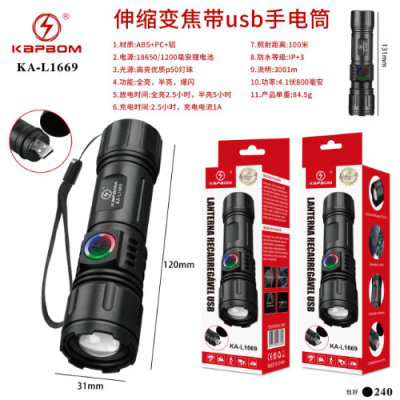
KA-L1669 USB Rechargeable Flashlight
Brand: Generic / OEM
•
Audited BOM: 8 Components
🛠️ Troubleshooting Guide & Return Mitigation
Verified Self-Service BaseQuick guide for your KA-L1669 USB Rechargeable Flashlight: USB charging, proper use, and common troubleshooting to ensure a long lifespan and prevent warranty claims.
RMA Prevention Tags:
#charging_misuse
#usb_connector_cleaning
#avoid_moisture
#proper_battery_use
🔍 Colloquial Consumer Search Queries:
“KA-L1669 flashlight not charging”
“LED flashlight won't turn on”
“how to charge USB flashlight”
“flashlight defect”
“rechargeable flashlight not working”
🚀 Quick Start & Safe Operation Guide
1
Before first use, fully charge the flashlight via USB using a compatible charger (not included).
🔒
+2 Detailed Operational Steps Locked in Torfus Pro
Unlock Steps
⚡ Easy DIY Troubleshooting & Common Fixes
🔧
prob_01
Flashlight does not turn on
Common root cause: Battery is discharged or the power button has a poor connection.
Step-by-step solution: 1. Connect the flashlight to a power source to charge for at least 30 minutes. 2. Ensure the power button is clean and being pressed correctly.
💡
Pro tip: Keep the flashlight partially charged at all times, avoiding complete discharge to prolong battery life.
📸
Evidence to provide support: Short video (5s) showing button press and no light.
🔒
+2 Exclusive Verified Technical Solutions Locked
Engineering diagnostics for mechanical jams, thermal overloads, and seal failures available in the Full Dossier.
Unlock Full Guide
🚫 What NEVER to Do (Common Misuse Warnings)
⚠️ Using high-power or incompatible chargers.
err_01
Consequence: Damage to the internal battery or charging circuit, potentially rendering the product unusable.
✓ How to avoid: Use standard USB power sources (5V) and good quality cables. Avoid fast charging adapters not specified for the product.
🔒 +2 Critical Misuse Warnings Locked
Engineering alerts to prevent motor burnout, voided manufacturer warranty, and catastrophic component breakdown.
View All Warnings
⚙️ Hardware Setup, Adjustments & FAQs
🔒 +1 Hardware Setup & Calibration FAQs Locked in Torfus Pro
Unlock
⚖️
⚖️ Seller Warranty & Marketplace Dispute Conciliation
Contact support for warranty service if, after following all instructions in this guide, the flashlight exhibits manufacturing defects such as not charging, not turning on even after a full charge, or showing visible defects not caused by misuse, as covered by the seller's warranty and marketplace return policy.