Electronics > Camera & Photo > Microscopes & Telescopes > Digital Microscopes
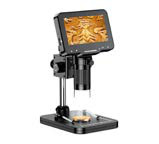
AMC-430 Digital Microscope 4.3-inch LCD Screen
Brand: Generic / OEM
•
Audited BOM: 10 Components
🛠️ Troubleshooting Guide & Return Mitigation
Verified Self-Service BaseQuick guide for the AMC-430 Digital Microscope: proper use, focusing, battery, and damage prevention for the best experience.
RMA Prevention Tags:
#correct_focus_adjustment
#adequate_battery_charging
#support_handling
#lens_cleaning
🔍 Colloquial Consumer Search Queries:
“amc-430 microscope not focusing”
“digital microscope battery not charging”
“amc-430 bad image quality”
“how to use 1000x microscope”
“microscope keeps freezing”
🚀 Quick Start & Safe Operation Guide
1
Fully charge the battery before first use. Connect the USB cable to the charging port and a power source.
🔒
+3 Detailed Operational Steps Locked in Torfus Pro
Unlock Steps
⚡ Easy DIY Troubleshooting & Common Fixes
🔧
prob_01
The image is never sharp or focus is impossible to adjust.
Common root cause: Incorrect distance between the lens and object, or improper focus adjustment.
Step-by-step solution: 1. Ensure the object is within the recommended focus range (0.4 to 1.6 inches / 10mm to 40mm). 2. Slowly turn the focus ring while watching the screen until the image is clear.
💡
Pro tip: Keep your hand steady when turning the focus ring and adjust the stand height if needed to optimize the distance.
📸
Evidence to provide support: Clear photo of object in focus and focus ring position.
🔒
+3 Exclusive Verified Technical Solutions Locked
Engineering diagnostics for mechanical jams, thermal overloads, and seal failures available in the Full Dossier.
Unlock Full Guide
🚫 What NEVER to Do (Common Misuse Warnings)
⚠️ Forcing focus adjustment beyond mechanical limits or using excessive force on buttons.
err_01
Consequence: Damage to the focus mechanism, broken buttons, or system lock-up.
✓ How to avoid: Turn the focus ring gently until resistance is felt and use buttons with light, precise touches.
🔒 +2 Critical Misuse Warnings Locked
Engineering alerts to prevent motor burnout, voided manufacturer warranty, and catastrophic component breakdown.
View All Warnings
⚙️ Hardware Setup, Adjustments & FAQs
🔒 +2 Hardware Setup & Calibration FAQs Locked in Torfus Pro
Unlock
⚖️
⚖️ Seller Warranty & Marketplace Dispute Conciliation
If, after following all usage and troubleshooting guidelines, the microscope exhibits persistent issues such as inability to focus, critical battery failure preventing charging, constant freezing unresolved by restarting, or severe visual image defects not corrected by cleaning and lighting adjustments, there may be a manufacturing defect justifying a warranty claim under the seller's warranty and marketplace return policy.