Office Products > Office Electronics > Printers > Label Makers & Thermal Printers
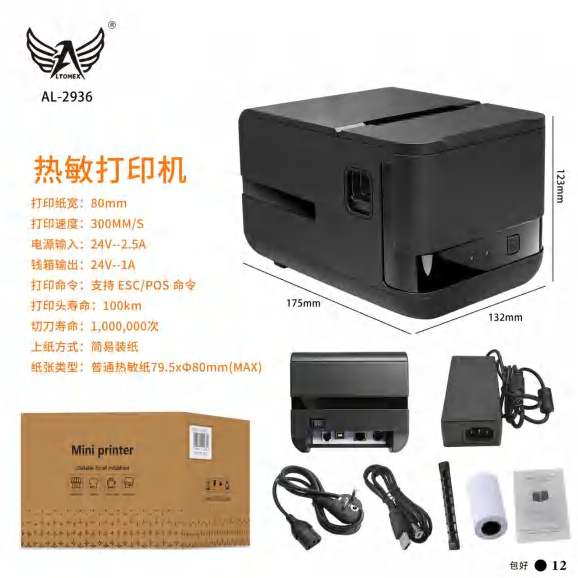
AL-2936 Non-Fiscal Thermal Printer for Coupons and Receipts
Brand: Generic / OEM
•
Audited BOM: 10 Components
🛠️ Troubleshooting Guide & Return Mitigation
Verified Self-Service BasePractical guide for the AL-2936 Thermal Printer: correct usage, common troubleshooting, and damage prevention to ensure optimal performance.
RMA Prevention Tags:
#correct_paper_roll_use
#thermal_head_cleaning
#power_supply_care
#driver_installation
🔍 Colloquial Consumer Search Queries:
“AL-2936 thermal printer not printing”
“coupon printer not working”
“AL-2936 paper error”
“printer won't turn on”
“receipt not printing”
🚀 Quick Start & Safe Operation Guide
1
Connect the power adapter and data cable (USB/Network) to your computer or POS system.
🔒
+3 Detailed Operational Steps Locked in Torfus Pro
Unlock Steps
⚡ Easy DIY Troubleshooting & Common Fixes
🔧
prob_01
Printer is on but not printing anything.
Common root cause: Paper roll improperly inserted or out of paper.
Step-by-step solution: Check if the paper is correctly positioned (heat-sensitive side up) and if there is enough paper. Replace the roll if necessary.
💡
Pro tip: Always use good quality thermal paper and verify the roll's orientation before closing the cover.
📸
Evidence to provide support: Clear photo of paper roll and its placement.
🔒
+2 Exclusive Verified Technical Solutions Locked
Engineering diagnostics for mechanical jams, thermal overloads, and seal failures available in the Full Dossier.
Unlock Full Guide
🚫 What NEVER to Do (Common Misuse Warnings)
⚠️ Forcing incorrect size or type of paper rolls.
err_01
Consequence: Damage to the paper feeding mechanism and sensor.
✓ How to avoid: Use only thermal paper rolls compatible with the dimensions specified for the AL-2936.
🔒 +2 Critical Misuse Warnings Locked
Engineering alerts to prevent motor burnout, voided manufacturer warranty, and catastrophic component breakdown.
View All Warnings
⚙️ Hardware Setup, Adjustments & FAQs
🔒 +1 Hardware Setup & Calibration FAQs Locked in Torfus Pro
Unlock
⚖️
⚖️ Seller Warranty & Marketplace Dispute Conciliation
Contact support under warranty if the printer exhibits a manufacturing defect, such as failure to initialize without apparent reason, main board issues not resolved by driver reinstallation or cleaning, or if the thermal head has persistent printing defects after indicated preventive maintenance. These are considered manufacturing defects that impede proper product use and are not caused by misuse.