Home & Garden > Lawn & Garden > Gardening Tools > Shears & Trimmers > Hedge Shears
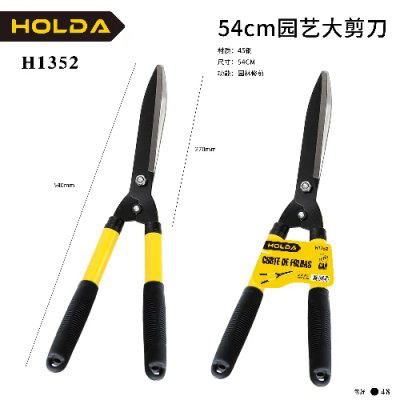
21-inch Hedge Trimmer H1352
Brand: Generic / OEM
•
Audited BOM: 7 Components
🛠️ Troubleshooting Guide & Return Mitigation
Verified Self-Service BasePractical guide for the 21-inch Hedge Trimmer H1352: proper use, maintenance, and troubleshooting to ensure durability and efficiency.
RMA Prevention Tags:
#blade_cleaning
#pivot_lubrication
#avoid_thick_branches
#dry_storage
🔍 Colloquial Consumer Search Queries:
“hedge trimmer h1352 stuck”
“hedge trimmer blade bent”
“hedge trimmer handle loose”
“hedge trimmer not cutting”
“hedge trimmer maintenance tips”
🚀 Quick Start & Safe Operation Guide
1
Ensure blades are clean and free of obstructions before each use.
🔒
+3 Detailed Operational Steps Locked in Torfus Pro
Unlock Steps
⚡ Easy DIY Troubleshooting & Common Fixes
🔧
prob_01
Blades sticking or difficult to cut.
Common root cause: Dirt, sap residue, or lack of lubrication at the pivot.
Step-by-step solution: Clean the blades with a damp cloth, then dry them. Apply a drop of lubricating oil to the pivot and move the blades a few times.
💡
Pro tip: Clean the trimmer after each prolonged use or when cutting sticky materials.
📸
Evidence to provide support: Short video (5-10s) showing blades sticking during use.
🔒
+2 Exclusive Verified Technical Solutions Locked
Engineering diagnostics for mechanical jams, thermal overloads, and seal failures available in the Full Dossier.
Unlock Full Guide
🚫 What NEVER to Do (Common Misuse Warnings)
⚠️ Cutting branches that are too thick or have a diameter exceeding the trimmer's capacity.
err_01
Consequence: Denting or breaking of the blades, damage to the cutting mechanism and pivot.
✓ How to avoid: Use the trimmer only for cutting hedges, shrubs, and foliage within its capacity. For thicker branches, use an appropriate saw or pruning shears.
🔒 +2 Critical Misuse Warnings Locked
Engineering alerts to prevent motor burnout, voided manufacturer warranty, and catastrophic component breakdown.
View All Warnings
⚙️ Hardware Setup, Adjustments & FAQs
🔒 +1 Hardware Setup & Calibration FAQs Locked in Torfus Pro
Unlock
⚖️
⚖️ Seller Warranty & Marketplace Dispute Conciliation
Warranty should be claimed if, after following usage and maintenance instructions, the blades show a manufacturing defect (such as bending or failure to cut without apparent reason), the pivot jams irreversibly, or there is any other defect that prevents normal product use, as covered by the seller's warranty and marketplace return policy.