Electronics > Portable Audio & Accessories > Portable Speakers > Bluetooth Speakers
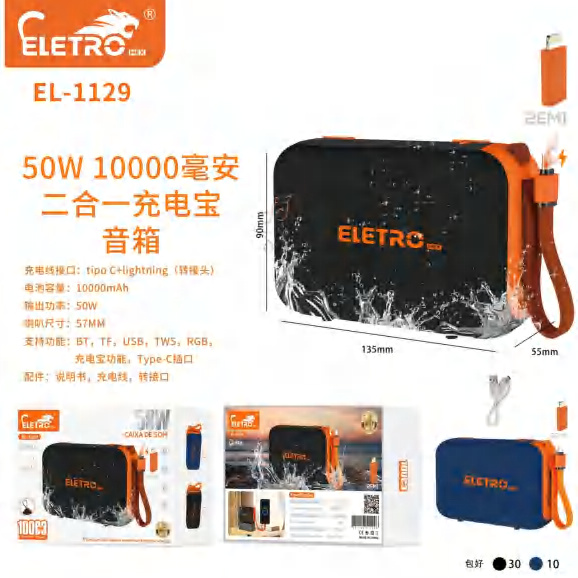
50W Portable Bluetooth Speaker 10000mAh Power Bank EL-1129
Brand: Generic / OEM
•
Audited BOM: 9 Components
🛠️ Troubleshooting Guide & Return Mitigation
Verified Self-Service BaseQuick guide for the 50W Portable Bluetooth Speaker 10000mAh Power Bank EL-1129: usage, care, and common troubleshooting to ensure performance and durability.
RMA Prevention Tags:
#improper_charger_use
#moisture_exposure
#product_drop
#connector_cleaning
🔍 Colloquial Consumer Search Queries:
“speaker el-1129 not turning on”
“el-1129 no sound”
“charge bluetooth speaker”
“bluetooth not connecting”
“power bank not working”
🚀 Quick Start & Safe Operation Guide
1
Fully charge the battery before first use, using the appropriate cable and power adapter.
🔒
+3 Detailed Operational Steps Locked in Torfus Pro
Unlock Steps
⚡ Easy DIY Troubleshooting & Common Fixes
🔧
prob_01
Speaker not turning on
Common root cause: Battery is drained or charging cable is not properly connected.
Step-by-step solution: Connect the charging cable and wait a few minutes before attempting to power on. Ensure the cable is firmly plugged in.
💡
Pro tip: Keep the speaker regularly charged, even when not in prolonged use.
📸
Evidence to provide support: Clear photo of the charging port and connected cable.
🔒
+3 Exclusive Verified Technical Solutions Locked
Engineering diagnostics for mechanical jams, thermal overloads, and seal failures available in the Full Dossier.
Unlock Full Guide
🚫 What NEVER to Do (Common Misuse Warnings)
⚠️ Using a phone charger with incompatible voltage/amperage or low quality.
err_01
Consequence: Damage to the battery, charging circuit, and potential overheating.
✓ How to avoid: Always use the provided USB cable and a compatible power adapter (5V/2A recommended).
🔒 +2 Critical Misuse Warnings Locked
Engineering alerts to prevent motor burnout, voided manufacturer warranty, and catastrophic component breakdown.
View All Warnings
⚙️ Hardware Setup, Adjustments & FAQs
🔒 +1 Hardware Setup & Calibration FAQs Locked in Torfus Pro
Unlock
⚖️
⚖️ Seller Warranty & Marketplace Dispute Conciliation
The warranty should be activated for manufacturing defects not caused by misuse, such as audio playback failures without apparent reason, battery issues that do not charge after correct use, or electronic failures that occur spontaneously. Refer to seller's warranty and marketplace return policy.