Tools & Home Improvement > Power & Hand Tools > Power Tools > Drills > Impact Drills
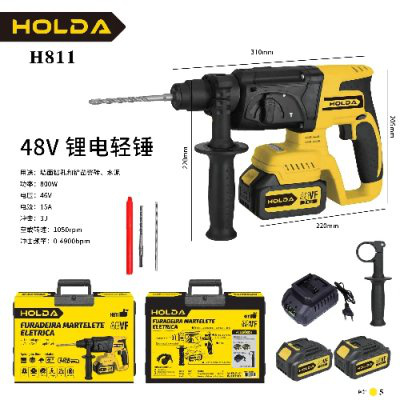
48V Cordless Impact Drill Driver H811
Brand: Generic / OEM
•
Audited BOM: 12 Components
🛠️ Troubleshooting Guide & Return Mitigation
Verified Self-Service BaseQuick Guide for your 48V Cordless Impact Drill Driver H811: proper use, common troubleshooting, and damage prevention for optimal performance and longevity.
RMA Prevention Tags:
#correct_battery_charging
#chuck_cleaning
#impact_function_usage
#case_storage
🔍 Colloquial Consumer Search Queries:
“h811 drill not turning on”
“48v battery not charging”
“impact driver weak”
“impact function not working”
“drill making strange noise”
🚀 Quick Start & Safe Operation Guide
1
Fully charge the 48V battery before first use, following the charger's instructions.
🔒
+3 Detailed Operational Steps Locked in Torfus Pro
Unlock Steps
⚡ Easy DIY Troubleshooting & Common Fixes
🔧
prob_01
Drill driver does not turn on or indicator light is off.
Common root cause: Battery is discharged or not properly seated.
Step-by-step solution: Check if the battery is fully charged and firmly seated in the drill driver base. Try removing and reinserting the battery.
💡
Pro tip: Always store the drill driver with a partially charged battery and avoid fully discharging it to extend battery life.
📸
Evidence to provide support: Clear photo of battery and its connection to the drill.
🔒
+2 Exclusive Verified Technical Solutions Locked
Engineering diagnostics for mechanical jams, thermal overloads, and seal failures available in the Full Dossier.
Unlock Full Guide
🚫 What NEVER to Do (Common Misuse Warnings)
⚠️ Using the drill driver on excessively hard materials without the impact function or with incorrect bits.
err_01
Consequence: Motor overheating, damage to the impact mechanism, or bit breakage.
✓ How to avoid: Always select the impact function for masonry and concrete. Use bits specific to each material type and avoid forcing the equipment.
🔒 +2 Critical Misuse Warnings Locked
Engineering alerts to prevent motor burnout, voided manufacturer warranty, and catastrophic component breakdown.
View All Warnings
⚙️ Hardware Setup, Adjustments & FAQs
🔒 +1 Hardware Setup & Calibration FAQs Locked in Torfus Pro
Unlock
⚖️
⚖️ Seller Warranty & Marketplace Dispute Conciliation
Contact support under the seller's warranty and marketplace return policy if the drill driver exhibits operational failures not resolved by the tips in this guide, such as the motor not turning on even with a charged battery, persistent failure of the impact function, or visible manufacturing defects.