Electronics > Portable Audio & Accessories > Portable Speakers > Bluetooth Speakers
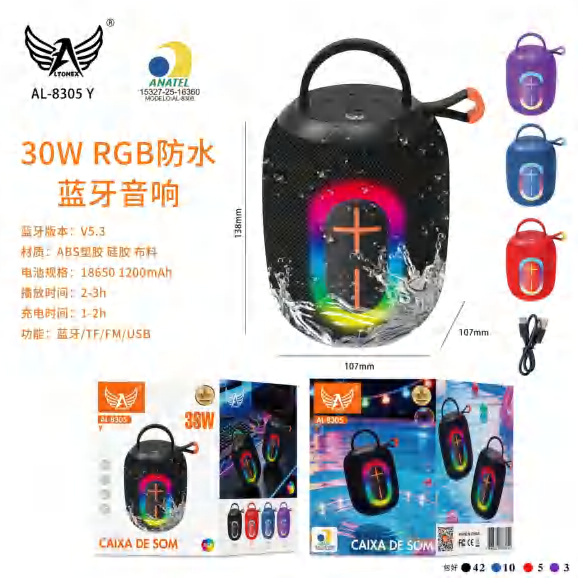
30W RGB Waterproof Portable Bluetooth Speaker AL-8305Y
Brand: Generic / OEM
•
Audited BOM: 11 Components
🛠️ Troubleshooting Guide & Return Mitigation
Verified Self-Service BaseQuick guide for your AL-8305Y speaker: usage, care, and common troubleshooting to ensure the best sound experience and durability.
RMA Prevention Tags:
#water_protection
#use_correct_charger
#clean_ports
#avoid_drops
🔍 Colloquial Consumer Search Queries:
“AL-8305Y speaker won't turn on”
“bluetooth speaker not connecting”
“RGB speaker not working”
“portable speaker low volume”
“how to charge speaker”
🚀 Quick Start & Safe Operation Guide
1
Fully charge the speaker before first use with the provided cable.
🔒
+3 Detailed Operational Steps Locked in Torfus Pro
Unlock Steps
⚡ Easy DIY Troubleshooting & Common Fixes
🔧
prob_01
Speaker does not turn on.
Common root cause: Battery is drained or charging cable is not properly connected.
Step-by-step solution: Connect the charging cable to a reliable power source and let it charge for at least 30 minutes. Ensure the cable is firmly plugged into the speaker and the power source.
💡
Pro tip: Keep the speaker regularly charged, even when not in use, to maintain battery health.
📸
Evidence to provide support: Clear photo of charging port and cable connected to power.
🔒
+2 Exclusive Verified Technical Solutions Locked
Engineering diagnostics for mechanical jams, thermal overloads, and seal failures available in the Full Dossier.
Unlock Full Guide
🚫 What NEVER to Do (Common Misuse Warnings)
⚠️ Exposing the speaker to direct water jets or prolonged immersion.
err_01
Consequence: Water infiltration into internal components, causing short circuits and permanent damage.
✓ How to avoid: Use the speaker in damp environments or light rain, but avoid submerging it or exposing it to strong water jets. If it gets wet, dry it immediately with a soft cloth.
🔒 +2 Critical Misuse Warnings Locked
Engineering alerts to prevent motor burnout, voided manufacturer warranty, and catastrophic component breakdown.
View All Warnings
⚙️ Hardware Setup, Adjustments & FAQs
🔒 +1 Hardware Setup & Calibration FAQs Locked in Torfus Pro
Unlock
⚖️
⚖️ Seller Warranty & Marketplace Dispute Conciliation
Warranty should be claimed if, after following all instructions in this guide, the product exhibits manufacturing defects that prevent normal operation, such as internal failures unrelated to misuse, sound board issues, or battery defects not resolved by proper charging, indicating a manufacturing defect.