Home & Kitchen > Kitchen & Dining > Kitchen Storage & Organization > Trash Cans
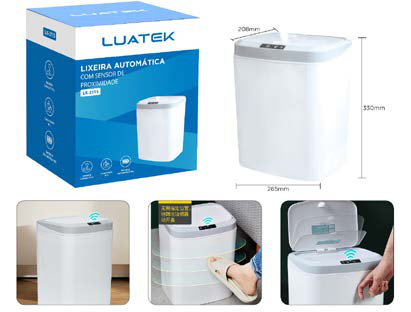
15L (4 Gal) Rechargeable Sensor Trash Can LK-2115
Brand: Generic / OEM
•
Audited BOM: 10 Components
🛠️ Troubleshooting Guide & Return Mitigation
Verified Self-Service BasePractical guide for your LK-2115 Sensor Trash Can: usage, care, and common troubleshooting to ensure perfect operation.
RMA Prevention Tags:
#dirty_sensor_area
#low_battery
#improper_cleaning
#sensor_obstruction
🔍 Colloquial Consumer Search Queries:
“sensor trash can not opening”
“trash can lid stuck”
“automatic trash can not working”
“rechargeable trash can problems”
“trash can not charging”
“lid won't close trash can”
🚀 Quick Start & Safe Operation Guide
1
Fully charge the battery before first use (approx. 4 hours).
🔒
+3 Detailed Operational Steps Locked in Torfus Pro
Unlock Steps
⚡ Easy DIY Troubleshooting & Common Fixes
🔧
prob_01
The trash can does not open when a hand is waved near it.
Common root cause: Sensor area is dirty or the battery is low.
Step-by-step solution: Gently wipe the sensor area with a dry cloth. If this does not resolve the issue, connect the USB cable to recharge the battery.
💡
Pro tip: Keep the sensor area clean and the battery charged for quick response.
📸
Evidence to provide support: Short video (5s) showing sensor and opening attempt.
🔒
+2 Exclusive Verified Technical Solutions Locked
Engineering diagnostics for mechanical jams, thermal overloads, and seal failures available in the Full Dossier.
Unlock Full Guide
🚫 What NEVER to Do (Common Misuse Warnings)
⚠️ Directly wetting the top of the trash can where the sensor and electronic components are located.
err_01
Consequence: Short circuits in electronic components, potentially damaging the sensor and main board.
✓ How to avoid: Clean the sensor area with a slightly damp or dry cloth. Never submerge the trash can in water or wash it under running water.
🔒 +2 Critical Misuse Warnings Locked
Engineering alerts to prevent motor burnout, voided manufacturer warranty, and catastrophic component breakdown.
View All Warnings
⚙️ Hardware Setup, Adjustments & FAQs
🔒 +1 Hardware Setup & Calibration FAQs Locked in Torfus Pro
Unlock
⚖️
⚖️ Seller Warranty & Marketplace Dispute Conciliation
Contact support for warranty service if, after following all instructions in this guide, the trash can exhibits a persistent manufacturing defect. This includes total sensor failure without apparent cause, inability to charge the battery even with the correct cable, or issues with the opening mechanism not resulting from misuse.