Office Products > Office Furniture & Accessories > Desk Accessories > Monitor Stands
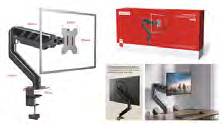
13"-32" Monitor Desk Mount Stand MT-37
Brand: Generic / OEM
•
Audited BOM: 10 Components
🛠️ Troubleshooting Guide & Return Mitigation
Verified Self-Service BasePractical guide for the MT-37 Articulated Monitor Mount: installation, usage, and common troubleshooting to ensure durability and prevent warranty claims.
RMA Prevention Tags:
#vesa_screw_adjustment
#monitor_weight_overload
#joint_tension_adjustment
🔍 Colloquial Consumer Search Queries:
“monitor mount arm stiff”
“monitor desk mount won't hold weight”
“monitor mount keeps falling”
“monitor arm hard to move”
“monitor mount loose”
“monitor mount keeps tilting down”
🚀 Quick Start & Safe Operation Guide
1
Firmly attach the mount base to your desk, ensuring it is secure and level.
🔒
+3 Detailed Operational Steps Locked in Torfus Pro
Unlock Steps
⚡ Easy DIY Troubleshooting & Common Fixes
🔧
prob_01
Mount does not hold the monitor in the desired position (falls or rises on its own).
Common root cause: Incorrect joint tension for the monitor's weight.
Step-by-step solution: Use the provided Allen wrench to tighten the adjustment screws on the main arm joint and the VESA connection arm.
💡
Pro tip: Adjust tension gradually, testing monitor movement after each tightening until the ideal balance point is found.
📸
Evidence to provide support: Short video showing monitor falling or rising after adjustment.
🔒
+2 Exclusive Verified Technical Solutions Locked
Engineering diagnostics for mechanical jams, thermal overloads, and seal failures available in the Full Dossier.
Unlock Full Guide
🚫 What NEVER to Do (Common Misuse Warnings)
⚠️ Installing a monitor exceeding the maximum weight capacity (10 kg / 22 lbs).
err_01
Consequence: Damage to joints, springs, and support mechanism, potentially leading to monitor fall.
✓ How to avoid: Check your monitor's exact weight and compare it with the mount's maximum load specification (2 to 10 kg / 4.4 to 22 lbs).
🔒 +2 Critical Misuse Warnings Locked
Engineering alerts to prevent motor burnout, voided manufacturer warranty, and catastrophic component breakdown.
View All Warnings
⚙️ Hardware Setup, Adjustments & FAQs
🔒 +1 Hardware Setup & Calibration FAQs Locked in Torfus Pro
Unlock
⚖️
⚖️ Seller Warranty & Marketplace Dispute Conciliation
Contact support for warranty if, after following all assembly and usage instructions, the mount exhibits manufacturing defects such as broken parts without apparent misuse, extreme adjustment difficulty that does not resolve with instructions, or if the support mechanism fails with a monitor within the specified weight limit.