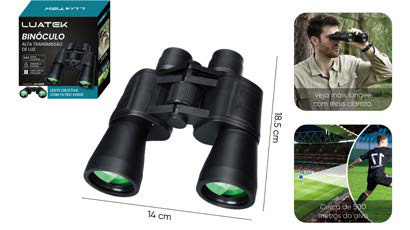
Sports & Outdoors > Outdoor Recreation > Camping & Hiking > Navigation & Optics > Binoculars
10x-24x Zoom Camping Binoculars LK-4103
Brand: Generic / OEM
•
Audited BOM: 13 Components
🛠️ Troubleshooting Guide & Return Mitigation
Verified Self-Service BasePractical guide for your LK-4103 Camping Binoculars: usage, care, and common troubleshooting to ensure the best experience on your adventures.
RMA Prevention Tags:
#lens_cleaning
#focus_adjustment
#proper_handling
#impact_protection
🔍 Colloquial Consumer Search Queries:
“LK-4103 binoculars not working”
“binoculars lens dirty”
“binoculars zoom stuck”
“blurry image camping binoculars”
“how to focus binoculars”
“binoculars blurry image adjustment”
🚀 Quick Start & Safe Operation Guide
1
Adjust interpupillary distance: Fold or separate the tubes until the images from each eye merge into a single, clear view.
🔒
+3 Detailed Operational Steps Locked in Torfus Pro
Unlock Steps
⚡ Easy DIY Troubleshooting & Common Fixes
🔧
prob_01
Double or misaligned image
Common root cause: The interpupillary distance (distance between your pupils) is not set correctly.
Step-by-step solution: Fold or separate the binocular tubes until the two images merge into a single, sharp picture.
💡
Pro tip: Observe a distant object and adjust until the image is comfortable and free of duplication.
📸
Evidence to provide support: Short video showing double image before adjustment.
🔒
+2 Exclusive Verified Technical Solutions Locked
Engineering diagnostics for mechanical jams, thermal overloads, and seal failures available in the Full Dossier.
Unlock Full Guide
🚫 What NEVER to Do (Common Misuse Warnings)
⚠️ Pointing the binoculars directly at the sun.
err_01
Consequence: Permanent damage to the user's retina and/or the internal optical components of the binoculars.
✓ How to avoid: Never, under any circumstances, look at the sun with the binoculars.
🔒 +3 Critical Misuse Warnings Locked
Engineering alerts to prevent motor burnout, voided manufacturer warranty, and catastrophic component breakdown.
View All Warnings
⚙️ Hardware Setup, Adjustments & FAQs
🔒 +1 Hardware Setup & Calibration FAQs Locked in Torfus Pro
Unlock
⚖️
⚖️ Seller Warranty & Marketplace Dispute Conciliation
The warranty should be activated if, after following all usage and troubleshooting instructions, the binoculars exhibit manufacturing defects such as cracked lenses without apparent impact, internal collimation issues (image always double even with correct adjustment), or failure in the zoom/focus mechanism that cannot be resolved with cleaning and proper handling. These are considered manufacturing defects that prevent normal use of the product.