Electronics > Networking Solutions > Cables & Accessories > Connectors & Adapters
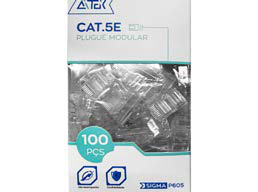
100-Pack Cat5e UTP RJ45 Network Connector SIGMA-P605
Brand: Generic / OEM
•
Audited BOM: 4 Components
🛠️ Troubleshooting Guide & Return Mitigation
Verified Self-Service BasePractical guide for Cat5e UTP RJ45 connectors: proper use, common troubleshooting, and damage prevention for stable network connections.
RMA Prevention Tags:
#improper_crimping
#damaged_connector
#incorrect_installation
#dirty_contacts
🔍 Colloquial Consumer Search Queries:
“cat5e rj45 connector not working”
“network connector won't fit”
“network cable connector problem”
“broken rj45 connector”
“how to crimp rj45 connector”
🚀 Quick Start & Safe Operation Guide
1
Prepare the network cable: remove about 1 inch (2-3 cm) of the outer jacket and untwist the 4 pairs of wires.
🔒
+3 Detailed Operational Steps Locked in Torfus Pro
Unlock Steps
⚡ Easy DIY Troubleshooting & Common Fixes
🔧
prob_01
Intermittent or no network connection after crimping.
Common root cause: Wires not properly crimped or not reaching the connector's internal contacts.
Step-by-step solution: Verify all 8 wires are firmly inserted to the end of the connector and that the crimping was done correctly with the appropriate tool. If necessary, cut off the connector and re-crimp.
💡
Pro tip: Ensure the cable's outer jacket is securely seated inside the connector after crimping to prevent looseness.
📸
Evidence to provide support: Clear close-up photo of the crimped cable end.
🔒
+2 Exclusive Verified Technical Solutions Locked
Engineering diagnostics for mechanical jams, thermal overloads, and seal failures available in the Full Dossier.
Unlock Full Guide
🚫 What NEVER to Do (Common Misuse Warnings)
⚠️ Forcing the connector onto the cable or into a network port.
err_01
Consequence: Broken plastic latches on the connector or damage to the device's network port.
✓ How to avoid: Always check for correct alignment and ensure there are no obstructions before connecting. Use appropriate force.
🔒 +2 Critical Misuse Warnings Locked
Engineering alerts to prevent motor burnout, voided manufacturer warranty, and catastrophic component breakdown.
View All Warnings
⚙️ Hardware Setup, Adjustments & FAQs
🔒 +1 Hardware Setup & Calibration FAQs Locked in Torfus Pro
Unlock
⚖️
⚖️ Seller Warranty & Marketplace Dispute Conciliation
Contact support for warranty if, after following all usage instructions and attempting troubleshooting, the connector exhibits a manufacturing defect, such as faulty metal contacts, cracks in the plastic structure without apparent misuse, or if the package contains visibly damaged or defective units, indicating a manufacturing issue.